
If you've been researching ways to streamline your business operations, chances are you've come across the term Odoo ERP. Whether you're a startup ready to scale, a mid-market company drowning in disconnected tools, or an enterprise looking for a cost-effective alternative to SAP or Oracle — Odoo ERP software has likely made it onto your shortlist.
But what exactly is Odoo ERP? How does it work? And is it the right fit for your business?
This complete guide walks you through everything you need to know about the Odoo ERP system — from its core architecture and module library to pricing models and real-world use cases. By the end, you'll have a clear picture of whether Odoo ERP is the solution your business has been looking for.
What Is Odoo ERP?
Odoo ERP is an open-source, modular Enterprise Resource Planning (ERP) platform that integrates all core business functions — accounting, sales, inventory, manufacturing, HR, CRM, e-commerce, and more — into a single, unified system.
Originally launched in 2005 as "TinyERP" and later rebranded as OpenERP before becoming Odoo in 2014, the platform has grown into one of the most widely adopted ERP systems in the world. As of 2024, Odoo serves over 12 million users across more than 170 countries, with a partner network spanning thousands of certified implementation experts globally.
What sets Odoo apart from traditional ERP software is its modular design philosophy. Rather than forcing businesses to buy and implement a monolithic suite all at once, Odoo lets you start with the modules you need — say, accounting and CRM — and expand as your business grows. This makes the Odoo ERP system accessible to companies of virtually any size or budget.
At its core, Odoo ERP is built on Python and uses PostgreSQL as its database engine. Its clean, web-based interface means there's no heavy client software to install — users access everything through a browser or the Odoo mobile app.
How Odoo ERP Systems Work
Understanding how ERP systems like Odoo function is key to appreciating their value. At the most fundamental level, an ERP system replaces the patchwork of spreadsheets, standalone software tools, and manual processes that most growing businesses accumulate over time with a single, integrated platform where all data lives in one place.
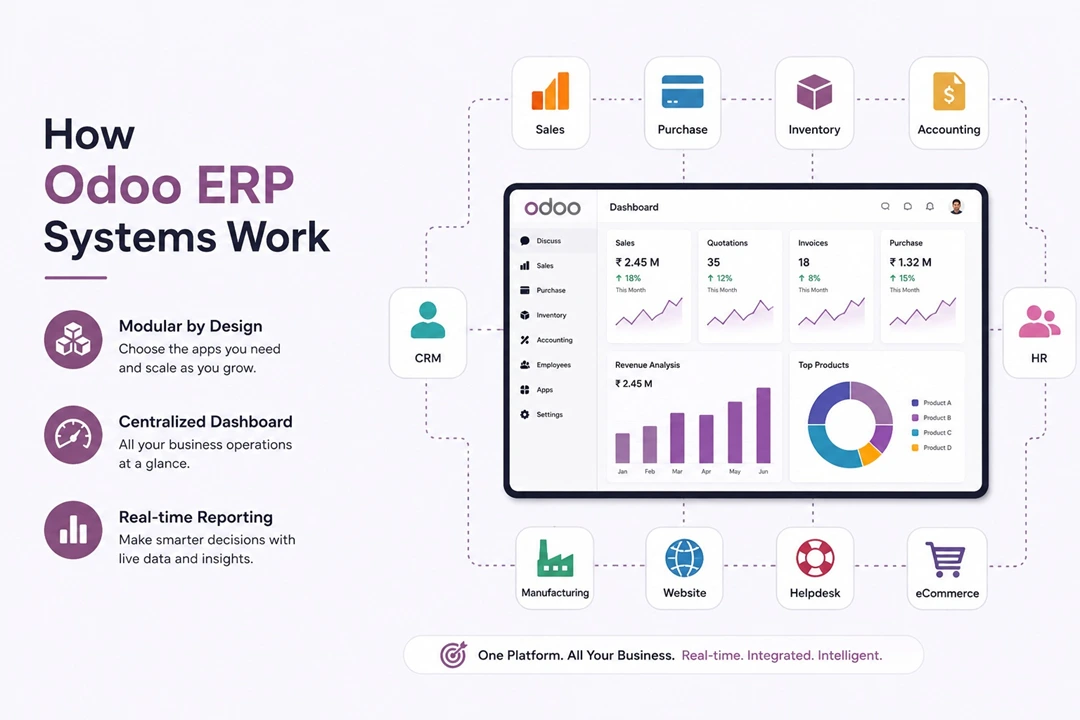
Here's how the Odoo ERP system works in practice:
Centralized Data Architecture
Every module in Odoo shares the same underlying database. This means when a sales order is confirmed, it automatically creates an accounting entry, triggers inventory allocation, notifies the warehouse team, and updates the customer's record in the CRM — all without any manual data entry or third-party integrations.
This "single source of truth" approach eliminates data silos, reduces human error, and gives management real-time visibility into every corner of the business.
Module-Based Architecture
Odoo ERP is built around apps (modules) that communicate seamlessly with each other. Each app handles a specific business function, but they're designed to work together. Installing the Sales app, for example, naturally connects with Inventory (for stock checks), Invoicing (to generate bills), and CRM (for customer tracking).
Workflow Automation
One of the most powerful features of Odoo ERP software is its workflow automation engine. Businesses can set up automated actions triggered by specific events — for example, automatically sending a follow-up email three days after a quotation is sent, or flagging a purchase order for approval if it exceeds a certain value. This reduces repetitive manual work and ensures consistent processes across teams.
Real-Time Reporting and Dashboards
Every module in Odoo comes with built-in reporting. From financial statements and cash flow projections to sales pipeline analysis and warehouse efficiency metrics, Odoo ERP delivers real-time business intelligence without requiring a separate BI tool.
Cloud or On-Premise Deployment
- Odoo Online (SaaS): Fully hosted and managed by Odoo, with automatic updates.
- Odoo.sh: A cloud platform-as-a-service option giving more control with easier customization.
- On-Premise: Self-hosted on your own servers, offering maximum control and customization.
Modules in Odoo ERP Software
One of the biggest selling points of Odoo ERP software is its extensive module library. With over 30 official core apps and thousands of community-built extensions available through the Odoo App Store, the platform can be tailored to virtually any industry or business model.
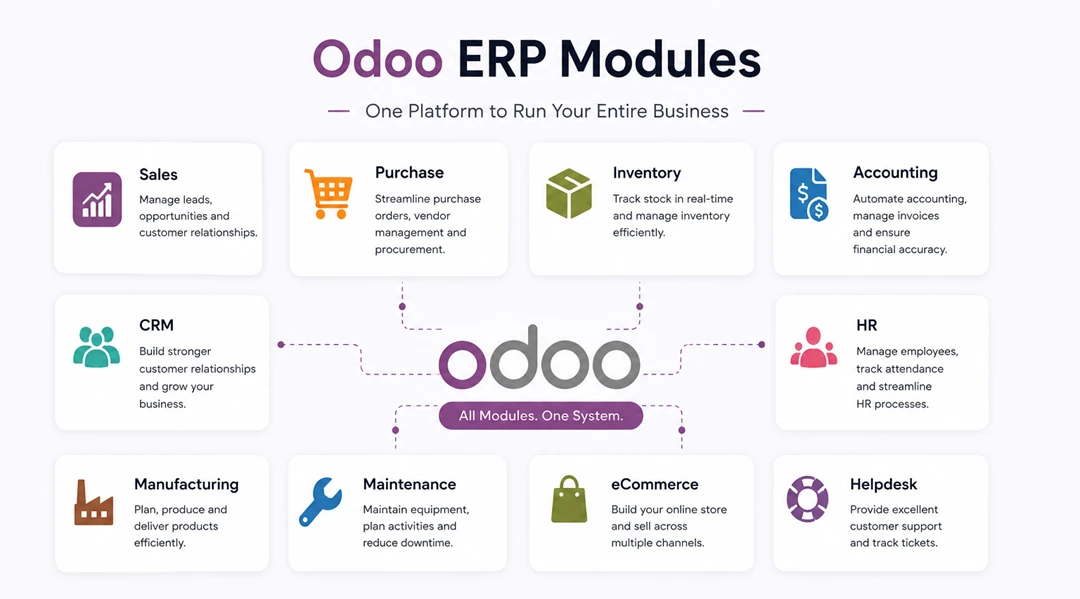
Here's a breakdown of the most widely used modules:
Sales & CRM
- CRM: Manage leads, opportunities, and your sales pipeline with Kanban views, automated follow-ups, and pipeline forecasting.
- Sales: Create quotations and sales orders, apply pricelists, manage product variants, and track sales performance.
- Point of Sale: A touch-friendly POS system for retail and restaurants, works offline and syncs with inventory automatically.
Finance & Accounting
- Accounting: A full double-entry bookkeeping system with bank synchronization, automated reconciliation, tax management, and financial reporting that meets local compliance requirements in dozens of countries.
- Invoicing: Streamline customer invoicing with recurring billing, payment terms, and online payment integration.
- Expenses: Employees submit expenses via the mobile app; managers approve with one click; accounting entries are created automatically.
Operations & Supply Chain
- Inventory: Multi-warehouse management, real-time stock tracking, barcode scanning, automated reordering rules, and full lot/serial number traceability.
- Purchase: Manage RFQs, purchase orders, vendor pricelists, and landed costs with seamless links to inventory and accounting.
- Manufacturing: Full MRP (Material Requirements Planning), bill of materials, work orders, shop floor management, and quality control.
Human Resources
- Employees: Centralize employee records, contracts, org charts, and skills management.
- Payroll: Country-specific payroll processing with automated salary computation, payslips, and tax filings.
- Leave Management: Online leave requests, approvals, and an attendance calendar synced with payroll.
- Recruitment: Manage job postings, applicant pipelines, interviews, and onboarding from a single interface.
Marketing & E-Commerce
- Website: A drag-and-drop website builder fully integrated with the rest of Odoo — products, blog, events, and forms all connect to your back office.
- E-Commerce: A complete online store with product catalogs, payment gateways, shipping integration, and automatic inventory updates.
- Email Marketing: Design, send, and analyze email campaigns with full segmentation and link tracking.
- Social Marketing: Manage and schedule social media posts across platforms from within Odoo.
Project & Field Service
- Project: Agile and Kanban project management with time tracking, milestones, and Gantt views.
- Helpdesk: Ticket management, SLA tracking, and customer portal integration.
- Field Service: Schedule and dispatch technicians, track work orders, and collect signatures on-site.
Benefits of Odoo ERP Implementation
Implementing an Odoo ERP system delivers tangible, measurable benefits across every function of the business. Here are the most significant:
1. Elimination of Data Silos
Before ERP, most businesses run on disconnected tools — accounting in QuickBooks, sales in Salesforce, inventory in a spreadsheet, HR in a standalone HRIS. Data lives in different systems, often duplicated or inconsistent. Odoo ERP breaks down those silos by centralizing everything in one database.
2. Significant Cost Reduction
Traditional ERP vendors (SAP, Oracle, Microsoft Dynamics) charge enormous licensing fees that put enterprise-grade software out of reach for small and mid-sized businesses. Odoo's open-source Community edition is free, and even the Enterprise edition is priced at a fraction of the cost of legacy ERP alternatives — typically $20–$50 per user per month depending on the module mix.
3. Faster, More Accurate Decision-Making
When all your business data lives in one place and dashboards update in real time, managers and executives can make better decisions faster. Instead of waiting for someone to compile a weekly report from multiple spreadsheets, leadership can pull up live sales figures, cash flow positions, or inventory levels at any time.
4. Improved Operational Efficiency
Odoo's automation capabilities dramatically reduce manual, repetitive tasks. Procurement teams no longer manually create purchase orders when stock runs low — reordering rules handle it automatically. Finance teams don't manually reconcile bank statements — Odoo does it with AI-assisted matching. These efficiency gains translate directly to labor cost savings and reduced error rates.
5. Scalability
One of the most common pain points for growing businesses is outgrowing their software. With Odoo ERP, you can start small — even with a single module — and progressively add capabilities as your operations expand. Companies have grown from 5 to 500 users on the same Odoo platform without needing to migrate to new software.
6. Better Customer Experience
When sales, inventory, and customer service all operate from the same data, customers benefit too. Sales reps can give accurate delivery dates because they have real-time inventory visibility. Support agents can see the full order history at a glance. E-commerce orders update warehouse stock instantly. All of this translates to faster fulfillment, fewer errors, and happier customers.
7. Regulatory Compliance
Odoo ERP software comes with built-in compliance features for many jurisdictions — VAT management, localized payroll, financial reporting standards, and GDPR-compliant data handling — reducing the risk of regulatory penalties.
Who Should Use Odoo ERP?
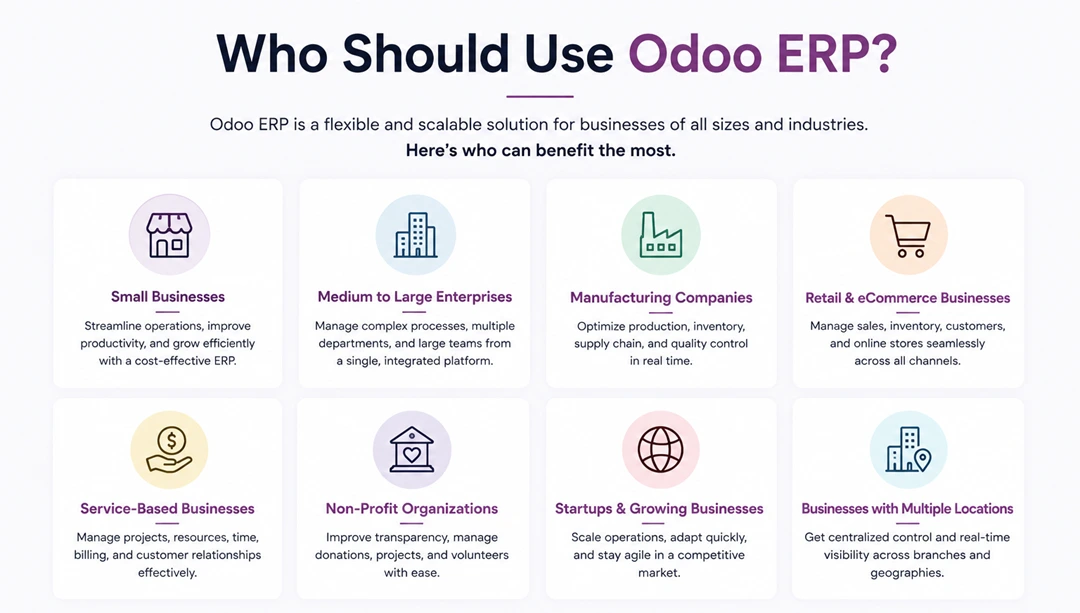
Odoo ERP is remarkably versatile, but it's not the right solution for every organization. Here's a realistic picture of who benefits most from adopting this ERP system:
Small and Medium-Sized Businesses (SMBs)
Odoo ERP software was arguably built with the SMB market in mind. The modular structure, affordable pricing, and ease of implementation make it ideal for companies with 10 to 500 employees that have outgrown entry-level tools like QuickBooks or basic project management apps but aren't ready for the complexity and cost of SAP or Oracle.
Fast-Growing Startups
Startups that anticipate rapid growth need a system that can scale with them. Starting with Odoo's free Community edition or a small Enterprise subscription, a startup can implement the modules it needs today and expand without a painful migration down the road.
Manufacturers and Distributors
Odoo's manufacturing and inventory modules are particularly strong. Companies with complex bills of materials, multi-step production processes, or multi-warehouse distribution operations will find Odoo ERP's supply chain capabilities highly capable.
Retail and E-Commerce Businesses
The integration between Odoo's POS, e-commerce, inventory, and accounting modules makes it a compelling choice for omnichannel retailers. A sale made online, in-store, or through a sales rep all feeds into the same inventory pool and generates the same accounting entries.
Service-Based Businesses
Professional services firms, agencies, IT companies, and consultancies benefit from Odoo's project management, timesheet, invoicing, and CRM capabilities. The ability to track time to a project, bill it to a client, and recognize revenue — all within one system — is a significant operational advantage.
Companies Replacing Legacy ERP
Organizations running outdated ERP systems (legacy SAP, Sage, or custom-built systems) often find Odoo ERP a compelling modernization path. It offers modern UI/UX, cloud deployment, mobile access, and continuous updates — things many legacy systems simply can't provide.
Odoo Community vs Enterprise
One of the most common questions prospects ask is: "What's the difference between Odoo Community and Odoo Enterprise?"
Odoo Community Edition
- Cost: Free and open-source (LGPL license)
- Hosting: Self-hosted only
- Modules: Core business modules included, but some advanced features are absent
- Support: Community forums and partner network; no official Odoo support
- Updates: Manual; you manage upgrades yourself
- Best for: Technical teams comfortable with self-hosting, smaller businesses with limited budgets, or companies that need heavy customization
Odoo Enterprise Edition
- Cost: Per-user monthly subscription (pricing varies by region and module)
- Hosting: Odoo Online (SaaS), Odoo.sh, or on-premise
- Modules: Full feature set including advanced accounting, payroll, sign, IoT, and more
- Support: Official Odoo support included
- Updates: Automatic (on Odoo Online) or managed upgrade tools (on-premise/Odoo.sh)
- Best for: Businesses that want a fully supported, production-ready ERP with the complete feature set.
Key Feature Differences
- Advanced payroll with country-specific localizations
- Electronic document signing (Odoo Sign)
- Studio (low-code customization tool for non-developers)
- IoT Box integration for manufacturing
- Odoo Mobile app for iOS and Android
- Advanced consolidation in accounting
- Barcode mobile app for warehouse operations
For most businesses serious about an Odoo ERP implementation, Enterprise is the recommended path — the additional features, support, and smoother upgrade cycle typically justify the subscription cost many times over.
Why Businesses Choose Odoo ERP Systems
With dozens of ERP options on the market, why do so many growing businesses ultimately choose Odoo ERP software? The answer comes down to a few consistent themes:
Unmatched Value for Money
Dollar for dollar, Odoo delivers more functional breadth than any comparable ERP platform at its price point. Businesses that evaluate Odoo against Sage, NetSuite, or Microsoft Dynamics almost universally find Odoo's total cost of ownership significantly lower — often by 50–70% over a five-year period.
Modern, Intuitive User Interface
Legacy ERP systems are notorious for their clunky, unintuitive interfaces that require weeks of training. Odoo's UI is clean, modern, and consumer-grade in its ease of use. Most users can navigate core workflows with minimal training, which dramatically reduces adoption friction and training costs.
True End-to-End Integration
Unlike business tool ecosystems that rely on Zapier or custom API integrations to share data between apps, Odoo is built as a single platform from the ground up. There are no integration layers to maintain, no sync delays, and no data discrepancies between modules.
Flexibility and Customization
Odoo's open-source foundation means the platform can be customized to fit virtually any business process. Odoo Studio allows non-technical users to customize forms, views, and workflows without code. For more complex needs, the active developer community and thousands of certified Odoo partners worldwide can build bespoke solutions.
Continuous Innovation
Odoo releases a major new version every year, consistently adding new features, improving performance, and expanding localization support. Unlike legacy ERP vendors that may release a major update every three to five years, Odoo's development pace is more akin to a modern SaaS company.
Strong Implementation Ecosystem
Odoo has built a global network of certified Gold and Silver partners — implementation firms that have been trained and vetted by Odoo. Regardless of your location, industry, or company size, there's almost certainly an experienced Odoo ERP implementation partner near you.
Open-Source Community
With thousands of developers contributing modules, localizations, and improvements to the Odoo community, the platform benefits from an innovation pace that proprietary vendors simply cannot match. The Odoo App Store hosts over 30,000 community-built apps covering everything from niche industry-specific extensions to integrations with popular third-party services.
Getting Started with Odoo ERP
If you've read this far and are considering an Odoo ERP implementation, here are the recommended first steps:
1. Define Your Requirements: Before evaluating any ERP, document your key business processes, pain points, and must-have vs. nice-to-have features. This clarity will help you scope your implementation correctly.
5. Plan for Change Management: Technology is only half the equation. Successful Odoo ERP implementations invest as much in training, process documentation, and user adoption as in the technical setup.
Final Thoughts
Odoo ERP has earned its position as one of the world's most popular ERP platforms by doing something most enterprise software vendors have failed at: making powerful, integrated business management software accessible to companies of all sizes.
Whether you're a growing SMB looking to replace a tangle of disconnected tools, a manufacturer needing tighter supply chain control, or a service business wanting to connect sales, delivery, and finance — Odoo ERP software offers a compelling, cost-effective, and scalable solution.
The question isn't whether Odoo can meet your needs. For the vast majority of growing businesses, it can — and will. The real question is how quickly you want to get started.